News
🛞 Tyre Change Season for Stored Tyres (October 13, 2026)
Stored tyres have a new Season tab. It shows how many customers with stored tyres have changed them this season, how many have booked and whom you still need to call.
- 📊 Changed, booked, appointment passed and not booked in one place for the current autumn or spring season
- 📞 A list of customers who have not booked, with their phone and rack position
- 🧾 A change counts by the completed Tire change order and, where there is no order, by what is in storage
- 🚗 Cars are counted, not sets, so a car with summer and winter tyres counts once
- ℹ️ Every figure has a short explanation of how it is counted
💸 Expenses with AI Document Reading (October 6, 2026)
In the new Expenses section you keep supplier invoices, receipts and other documents. Upload a PDF or photo of a document and AI reads its header.
- 🤖 AI reads the supplier, document number, dates, amounts with and without VAT and payment details
- ✏️ You review and confirm every document first, and only then does it count in the totals
- ⏰ Overview of unpaid and overdue documents and the total of expenses for a period
- 🔎 Search by supplier, company ID, document number or variable symbol
- 📱 Payment QR code for the supplier invoice for Slovak and Czech workshops (PAY by square, QR Platba)
- 📎 The original document stays attached to the expense
🧾 Advance Invoices (September 27, 2026)
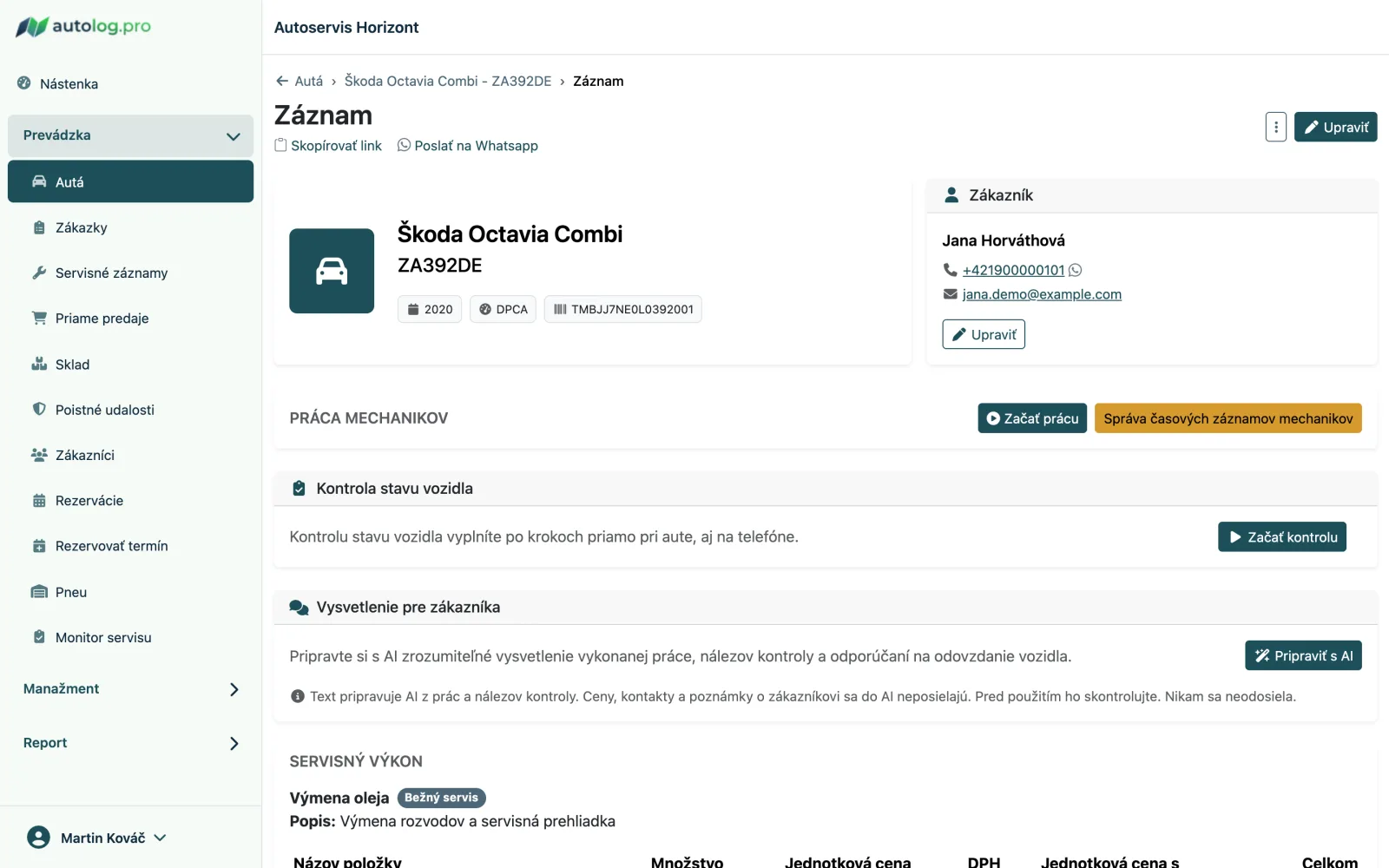
You can now issue an advance invoice for a service job, a request to pay an advance. Once the customer pays, you record the payment and the job's final invoice deducts the paid advance automatically.
- 📄 Advance invoice straight from the service record, with a PDF to print or send by email and a payment QR code
- 💶 Record the received payment, also directly from the list, including the date it was received
- 🧮 The paid advance is deducted on the invoice for the same job
- 🔎 A list of advance invoices filtered by status and period, and an advance indicator on the job
- ✏️ Correct or delete an unpaid advance invoice, and reverse a payment recorded by mistake until an issued invoice deducts it
- ℹ️ An advance invoice is not a tax document; for Slovak VAT payers Autolog shows the deadline for issuing one
🔧 Service Intervals and Interval Templates (September 27, 2026)
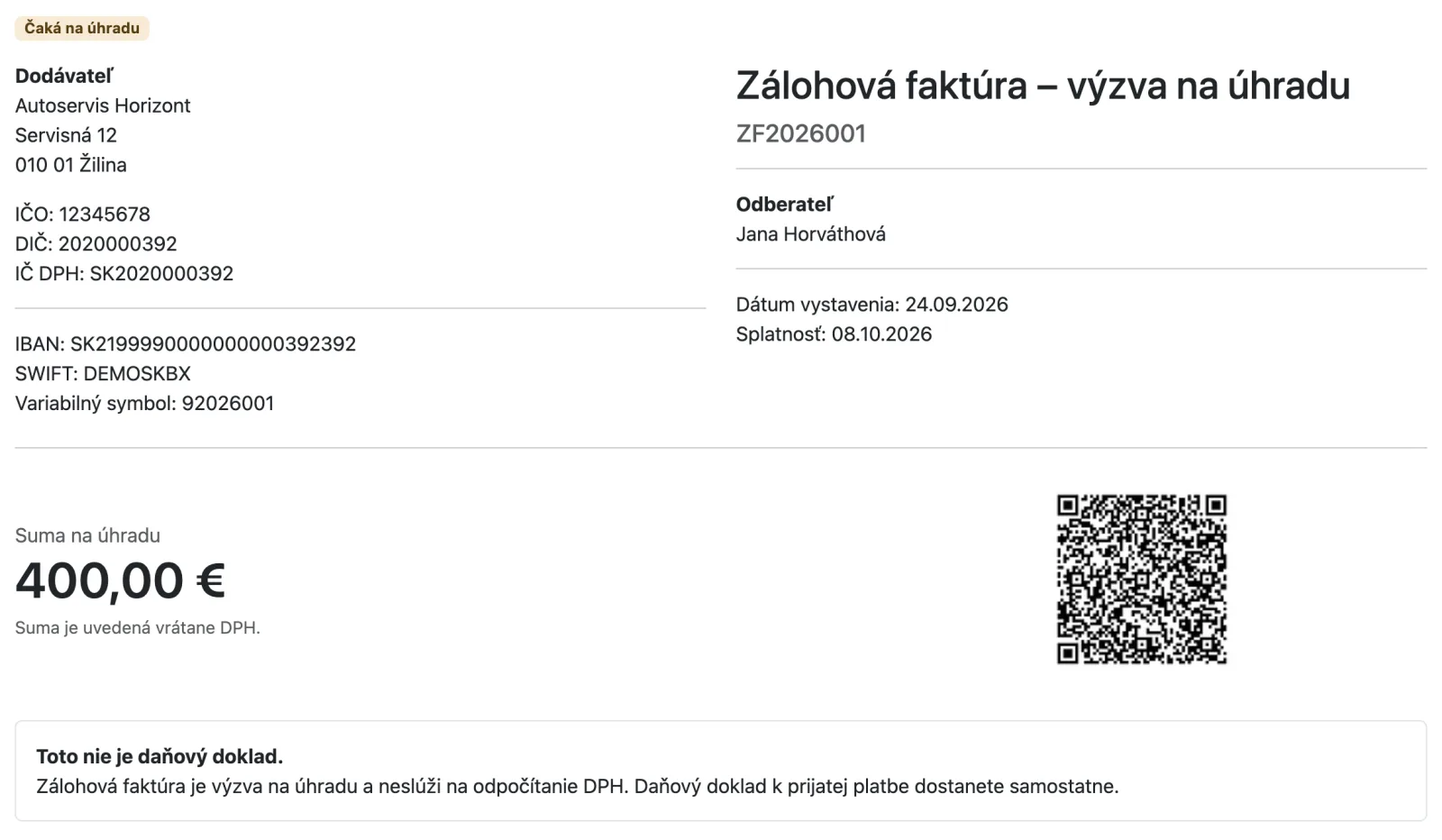
Manage a vehicle's service intervals from a single card on the vehicle detail. Prepare templates for new vehicles so you don't have to enter the same intervals again and again.
- 📋 A service intervals card on the vehicle overview: add, edit or remove a service without opening the whole form
- 🧩 Workshop interval templates, for example for a standard car, a long-interval diesel or a taxi, to choose when creating a vehicle
- 🔁 Apply a template to an existing vehicle too, with a preview of what will be added, changed or removed before you confirm
- 🛢️ Your own default oil change interval for all new vehicles in the workshop
- ⚙️ Intervals and reminders for transmission oil, front and rear differential oil and the Haldex coupling
- 🔔 A vehicle shows and reminds only the services it actually has; removing a service cancels its pending reminders
🎨 A New Look for the App (September 27, 2026)
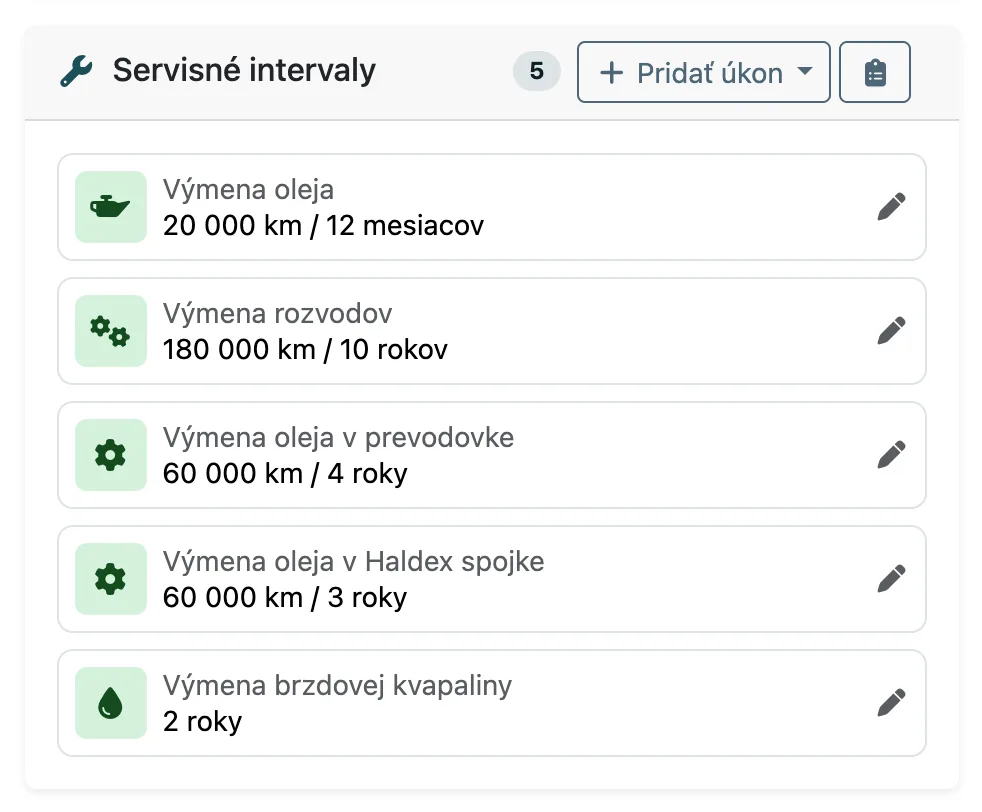
Autolog has a new layout with a sidebar menu. The app offers it to you on its own, and you can switch back to the original look at any time from your profile menu.
- 🧭 A sidebar menu with grouped sections and a workshop switcher in the top bar
- 🚗 A redesigned vehicle list, detail and form with navigation and actions in the page header
- 🧾 A service record header with vehicle and customer cards
- 🛞 New stored tyres screens; start a new storage straight from the list by picking a car
- 👥 Clearer screens for users, services, workplaces and item templates
- 🌙 Your layout choice is saved to your account, and light and dark mode stay as they are
📋 Vehicle Condition Inspection (September 26, 2026)
You can now record a vehicle condition inspection at the service record instead of on a paper form. The vehicle details are filled in automatically and the inspection is completed step by step, on a phone right at the car as well.
- ✅ 59 checkpoints in 8 sections with the statuses OK, Monitor, Needs attention and Not applicable
- 📏 Measurements of brakes in %, tyre tread in mm, DOT, fluids and battery voltage
- ⚡ A "Rest of section OK" button and a summary of findings before the inspection is completed
- 📄 A colour PDF report for the customer with the findings summary on the first page and section illustrations, to print or send by email
- 🚗 The vehicle shows its inspection history and the findings of the latest completed inspection for the next service
- 🤖 AI handover explanation: prepares a text for the customer from the work and the inspection findings, which you edit and copy before use
📍 SECAR GPS Integration (September 7, 2026)
Besides Fleetware, Autolog now also reads vehicle mileage from SECAR, so service reminders are based on real mileage.
- ⚙️ Add SECAR in the workshop's GPS integration settings
- 🚘 Automatic vehicle pairing and regular mileage synchronization
- 🔒 Read-only access, Autolog changes nothing in SECAR; sign-in credentials are stored encrypted
🚚 Fleet: What Needs Attention in Your Fleet (September 6, 2026)
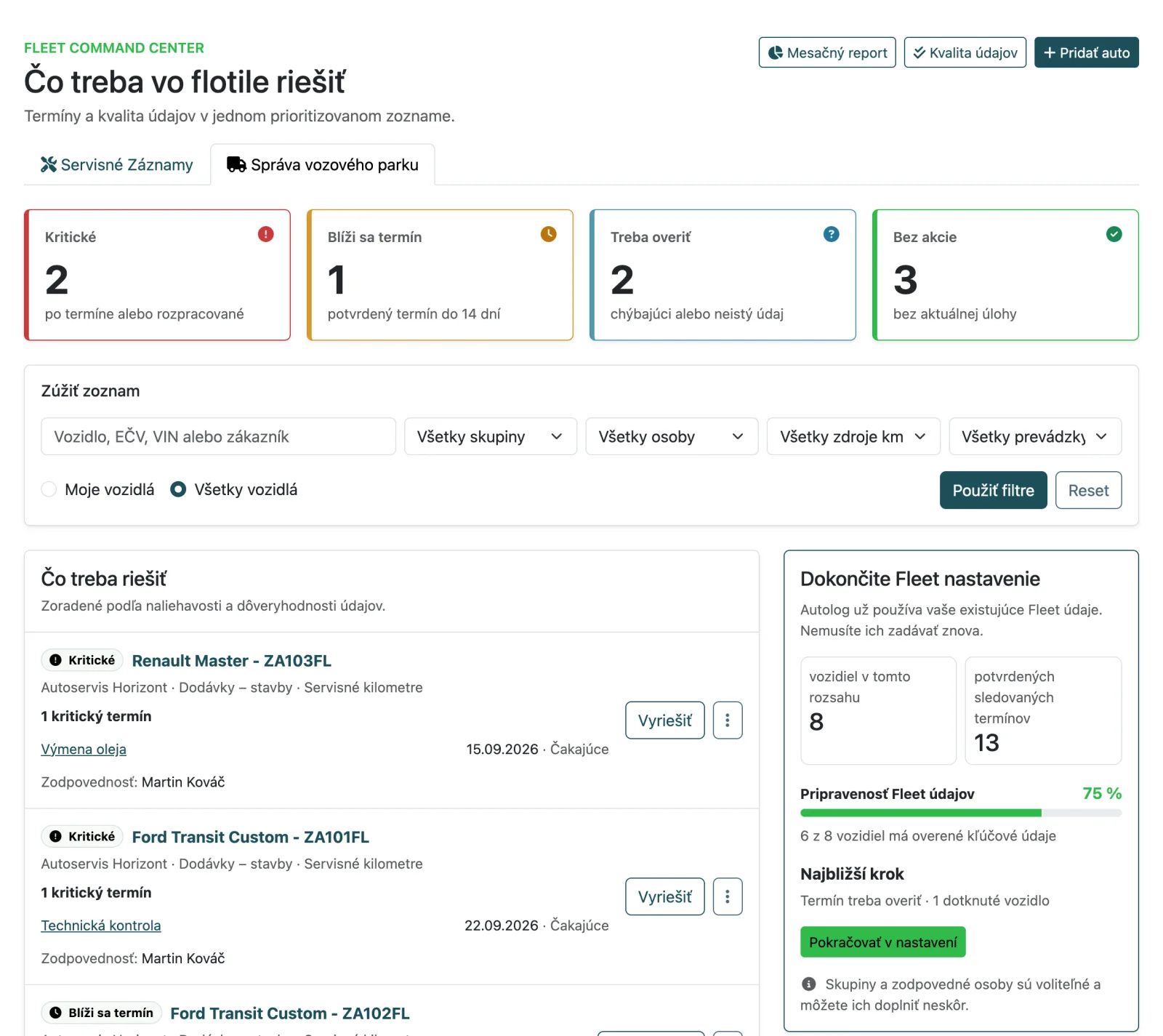
The Fleet dashboard sorts vehicles by urgency, so a fleet manager immediately sees what is overdue, what is coming up and where data is missing.
- 🚦 Vehicle states Critical, Due soon (within 14 days), Needs verification and No action
- 🔎 Filters by vehicle group, responsible person, mileage source and workshop
- 🗂️ Vehicle groups and bulk changes for up to 200 vehicles at once: group, responsible person and mileage source
- 🧹 A data quality check separates confirmed deadlines from data that needs to be verified or completed
- 📧 A monthly fleet report by email for chosen recipients: completed tasks, critical deadlines and deadlines in the next 90 days
- 🧭 A setup guide for new and existing Fleet vehicles
🤖 AI-Powered Stock Receipt Scanning (July 15, 2026)
Upload a supplier delivery note, invoice, or receipt as a PDF or photo and Autolog prepares an editable stock receipt from it.
- 🔎 AI reads the supplier, document number and date, stock lines, supplier codes, quantities, and prices
- 🏷️ Supplier codes confirmed during receipt posting are saved to stock items and become searchable
- ✏️ Review and correct every field before saving a draft or posting stock
- 📎 The original document remains attached to the stock receipt as source evidence
📦 Supplier Management in Inventory (July 5, 2026)
Inventory now has dedicated supplier records so receipts, stock items, and imports are connected more clearly.
- 🏢 New supplier records with contact, address, and account details
- 📄 Suppliers linked to receipts, document lines, and stock items
- 📥 CSV imports can use a supplier's default format or create the supplier automatically
- 🗂️ Archive suppliers without losing stock record history
✍️ Tablet Signatures for Service Protocols (June 27, 2026)
Acceptance and handover protocols can now be signed directly on a tablet, so you can finish customer paperwork without printing or scanning.
- 📋 Sign acceptance and handover protocols directly on the tablet
- 🖊️ Customer signs on the spot during vehicle intake or handover
- 📄 Signed PDF stays attached to the service order with signer name and signing time
👥 Mechanics Without System Access (June 23, 2026)
You can now keep mechanics in Autolog and assign work to them without giving them an email, password, or system access.
- 🛠️ Assign service work, absences, and reports without login credentials
- 🔒 Users without access cannot sign in and do not receive system emails
- 👥 Useful for internal mechanics and shop-floor staff where work tracking is enough
👥 Mechanic Absences and Better Capacity Planning (June 20, 2026)
Workshop availability settings can now track vacations and other mechanic absences so scheduling better reflects your team's real capacity.
- 📅 Absences by mechanic, date, and time
- ⚠️ Conflict warnings for already assigned service work
- 📊 List and visual overview of team availability
📅 Public Booking Slots per Service (June 2, 2026)
You can now set how often public booking slots should be shown for each service.
- ⚙️ Separate public slot interval directly in service settings
- 🕒 Offer slots, for example, every 15, 30, or 60 minutes
- 🔒 The real duration of the service and options still blocks the calendar correctly
📦 Advanced Inventory Management (May 24, 2026)
Inventory now has new documents, reports, and controls so it is clearer what came in, what went out, and what needs replenishing.
- 📄 Stock receipts, stock issues, drafts, voids, and receipt supplements
- 🔁 Inventory counts, stock corrections, returns to stock, and archived items
- 🖨️ PDF printing and email sending for stock documents
- 📊 Movement Ledger, Inventory Differences, and Replenishment reports with CSV export
⭐ Google Reviews by SMS (May 7, 2026)
We added a way to ask customers for a Google review by SMS with a direct link to your review profile.
- 📨 Send the request from the customer card or a completed service record
- 🔁 Resend the request when needed
- ✅ Mark customers who have already left a review
- 🔎 Filter customers by Google review status
💶 Enter Prices With or Without VAT (May 3, 2026)
Workshop settings now let you choose whether your daily price entry should use prices with VAT or without VAT.
- ⚙️ One setting for how prices are entered across the workshop
- 🧾 Applies to service records, direct sales, stock, templates, and the service catalog
- 👀 Totals and public prices remain clear with VAT included
📺 Service Monitor for Reception (April 23, 2026)
The Service Monitor is now ready for reception screens on a TV or tablet so both customers and staff can immediately see what is waiting, what is currently in progress, and what was completed most recently.
- 🚗 Waiting queue with today's current order of vehicles
- 🛠️ Overview of vehicles currently being worked on
- ✅ Recently completed vehicles from today on one screen
- 👀 Clear shared view for customers and reception staff
💰 Profit Summary in Service Record (April 20, 2026)
We added a new Profit Summary to the service record detail so you can check job profitability immediately without switching to reports.
- 📊 Quick financial overview directly in each service record
- 🔍 Better control over profitability per individual job
- ⚡ Less clicking during daily performance checks
🧾 Technician Worksheet (April 14, 2026)
You can now print a clear mechanic-facing worksheet from a service record without prices, with optional internal notes and space for handwritten notes directly in the workshop.
- 🖨️ A4 worksheet print directly from the service record
- 🔒 No prices or customer-facing details, better suited for workshop execution
- 📝 Select internal notes and leave space for handwritten mechanic notes
📅 More Accurate Online Booking Availability (March 20, 2026)
Online reservations now better respect one-time closures and special opening hours set by the workshop.
- 🚫 Workshops can temporarily stop accepting bookings for a specific date and time
- 🕒 Customers only see slots that are truly available to book
- 🎄 Useful for holidays, business trips, seasonal closures, or exceptional downtime
🚚 Shared Service History for Fleet Vehicles (March 2, 2026)
Fleet vehicle detail now also shows shared service records from other workshops.
- 📋 Unified timeline with local and shared records
- 👁️ Clear read-only marking for shared records
- 🧩 Shared item details, mileage, and date directly in the overview
📍 GPS Sync for Mileage and Reminders (March 1, 2026)
Added GPS integrations to automatically load mileage and improve reminder scheduling accuracy.
- ⚙️ New GPS Integrations section (Fleetware) in workshop settings
- 🚘 Automatic vehicle matching by plate number and GPS mileage import
- 🔄 “Sync now” button plus regular nightly synchronization
- 📅 More accurate mileage-based reminder recalculation from real usage
📊 More Accurate Financial Overview in Reports (February 26, 2026)
Reports now make the difference between labor revenue and labor profit much clearer.
- 💼 New labor revenue metric alongside labor profit
- ℹ️ Added info popovers next to key numbers
- 📈 Clearer share of labor and parts in total income
❄️ Label for Next A/C Service (February 25, 2026)
The A/C service label now automatically includes the date of the next service.
- 📅 Next date calculated from vehicle service intervals
- 📌 Clearer customer information when handing over the car
- 🖨️ Available directly in the service label print
🗓️ Last Completed Service in Cars List (February 22, 2026)
The cars list now shows the date of the last completed service without opening car detail.
- ⚡ Faster overview when planning the next service
- ✅ More precise date of the last completed work
- 🚗 Better orientation when working with many vehicles
🔎 Better Service Record Filters and Stats (February 21, 2026)
Service record overview is now clearer and faster for daily operations.
- 💳 Payment status filter (paid/unpaid)
- 📊 Clickable stats now preserve active filters
- 📆 Better filtering for completed records in the current month
⏳ Minimum Lead Time for Online Bookings (February 13, 2026)
You can now set how many hours in advance customers can create an online reservation.
- 🛡️ Prevent last-minute bookings
- ⚙️ Simple setup in Workshop Settings
- 📅 Applies to online bookings
📨 Automatic SMS Reminders for Vehicle Inspections (February 13, 2026)
We added an option to enable automatic SMS reminders for technical and emissions inspections.
- ✅ Turn on/off as needed
- 🔔 Reminders are sent automatically
- 🌍 Messages are localized by language
📊 Enhanced Payment Report with Analytical Insights (February 11, 2026)
The overview report now includes detailed analytical breakdown of payment status with trends, efficiency, and comprehensive insights.
- 📈 Revenue and unpaid invoice trends with percentage changes
- 💰 Detailed breakdown by payment status
- 🎯 Order completion success rate
- ⚡ Efficiency analytics with averages per order and service record
💳 Service Record Payment Status Tracking (February 11, 2026)
Each service record now has its own payment status for better financial flow control.
- 💰 Five statuses: Unpaid, Pending, Paid, Refunded, Failed
- 🔄 Automatic synchronization with invoices and service orders
- 🎨 Color-coded status indicators directly in the service records list
- ⚡ Quick status change with a single click
🔒 Enhanced Security and Performance (February 8, 2026)
We implemented advanced security measures and improved search performance.
- 🛡️ Rack::Attack protection against excessive requests
- 🚀 Faster autocomplete
- ⚡ Trigram indexes for faster database searches
🎨 Custom Colors for Reservation System (January 18, 2026)
Workshops can now customize color schemes in the reservation calendar to match their brand identity.
- 🎨 Customizable colors for different reservation types
- 👁️ Better visual identification in the calendar
📝 Internal Notes with Real-time Updates (January 16, 2026)
We added an internal notes system for better team communication on service records.
- 💬 Real-time note updates without page refresh
- 📧 Optional email notifications for new notes
- 👁️ Read/unread note tracking
- 🔔 Unread notes indicator
⚡ Simplified Quick Actions on the Dashboard (January 7, 2026)
We reorganized the quick actions section and removed duplicates so you can reach common tasks even faster.
- 🚀 Faster layout for the most-used actions
- 🧹 Less clutter thanks to removed duplicates
- 📋 Clearer panel without unnecessary scrolling
🏷️ More Service Label Types (December 13, 2025)
We expanded service labels to cover more specific maintenance tasks.
- 🛢️ Oil, brake fluid, coolant
- ⛓️ Timing system (belt/chain), transmission oil, general service
- 🖨️ Quick printing directly from the service record
📈 More Accurate Mileage Estimates (December 12, 2025)
Improved average mileage calculation so reminders and maintenance intervals are more precise.
🛠️ Equipment Servicing (December 3, 2025)
You can now service gear without a VIN (e.g., garden machinery) and print its QR codes/labels.
⏱️ Work Time Tracking for Mechanics (November 25, 2025)
We've introduced a comprehensive work time tracking system for mechanics that enables precise measurement of time spent on individual service records.
- ⏰ Start/stop timer for each mechanic on a service
- 📊 Global indicator of running timers in the navigation menu
- 🔔 Overview of all active timers in a dropdown menu
- 📈 Automatic recording of actual work time
- 📋 Detailed work hour reports for each mechanic
- 🎯 Better productivity control and more accurate cost calculations
The system is intuitive and easy to use – mechanics simply start the timer when beginning work and stop it upon completion. All times are automatically recorded and available in reports.
📝 Internal Notes for Service Records (November 2025)
We've added the ability to maintain internal notes for service records that are visible only to workshop staff.
- 🔒 Private notes not shared with customers
- 📝 Edit and add notes directly in the service record
- 🕐 Complete change history of notes
- 👥 Track who and when modified notes
Ideal for internal notes about work complexity, special tools used, or important details that customers don't need to see.
🔍 Filter service records by type (October 18, 2025)
We added a record type filter to the Service Records list, so you can quickly find exactly what you need.
- 🗂️ Toggle: All / Service records only / Pricing quotes only
- ⚡ Fast filtering – selection is applied automatically
- 🔎 Works together with search and status filter
🏷️ Workshop Public Name – Two Names for One Workshop (October 18, 2025)
Some workshops have a billing name and want a different public display name. Now it's possible!
- 💼 Billing Name (Legal/Official) – used on invoices and official documents
- 🌐 Public Display Name – optional, shown on website and booking system
- ⚙️ Easy setup in Workshop Settings
- ✅ If public name is not set, billing name is used automatically
Example: Invoices keep the name "ProMotor Ltd.", but customers see "Quick Service" on the website.
📅 Work Date for Mechanics – Better Work Overview
We've added the ability to record a work date for each mechanic on a service record. Now you have a clear overview of who worked and when on individual tasks.
- 📋 Assign work date when adding a mechanic to a service
- 📊 Precise overview of individual mechanics' work by day
- 🕐 Automatic date assignment from the service record date
- 📈 Better planning and analysis of mechanic capacity
With work dates, you can more easily track the workload of individual mechanics and have a precise record of who worked when.
📊 Enhanced Dashboard with Clickable Filters
We've significantly improved the dashboard for faster access to important information and better overview of daily activities.
- 🖱️ Clickable statistics for quick record filtering
- 📅 Overview of today's planned services
- ✅ Display of today's completed services
- 📋 Upcoming activities for the next 7 days
- 🚀 Quick access to relevant records with one click
The dashboard now provides an interactive overview where you can click on statistics to instantly display the corresponding service records.
🖼️ Better Vehicle Document Viewing
We've improved the display of photos and documents for vehicles for more comfortable viewing and working with documentation.
- 🔍 Full-screen view and zoom
- ➡️ Smooth navigation between photos and documents
🛞 Stored Tires – Search and Export
The stored tires overview now supports search and improved Excel export.
- 🔎 Quick tire search
- 📊 Improved Excel export
⚙️ Transmission Oil – New Intervals and Service Labels
We've added the ability to track transmission oil change intervals and print service labels.
- 🛠️ Tracking transmission oil change intervals
- 🏷️ Print service label for transmission oil
- 📅 Automatic reminders for next change
🧊 Coolant Service
We've added a new service action with smart calculation of the next change date and the ability to print a service label.
- 🧪 Recording of cooling system flush
- 📅 Automatic calculation of next change date based on vehicle interval
- 🏷️ Print label directly from record: date, mileage (if specified), flush information, and next change date
- ⚙️ Adjustable dimensions and font size in Workshop Settings; PDF generation for label/thermal printers
- 🖨️ For multiple actions, find print in dropdown menu; for single action, a separate button is available
📅 Planned Service Records – Clearer
Planned records are now better marked and only relevant actions are displayed.
- 🗂️ Clear marking of planned records
- ✨ Clearer action display
📷 Photo Upload – Faster and Clearer
Faster photo upload with automatic size optimization and upload progress display.
🔗 Service Categories and Quick Links
In the online booking system, services have new categories and anchors for quick navigation to specific sections. Customers can more easily navigate the service offerings.
🧾 Change History – More Detailed Overview
Change history now displays all modifications including deleted data for better overview of changes.
📨 SMS Reminders – Unified Messages
SMS reminders now have a unified format for more professional communication with customers.
🏷️ New: Service Labels for Better Organization!
We've added the ability to print specialized service labels that help you better organize and mark completed work on vehicles.
- 🛢️ Label for oil interval and oil change
- ❄️ Label for air conditioning service with detailed information
- ⚙️ Label for timing system replacement (belt/chain)
- 🖨️ Easy printing directly from service record
Labels contain all important information about the performed service and can be attached directly to the vehicle.
🛒 New: Direct Sales
We've added a new direct sales functionality that allows you to create invoices without service records. Perfect for selling spare parts, oil, or other items directly to customers.
- 💰 Quick invoice creation without service records
- 🔍 Search and filter direct sales
- 📋 Simple sales management in a clear table view
- 🚀 Enhanced invoice generation with all necessary details
👥 Faster Access to Customer Data
We've improved navigation between customers and vehicles for faster work.
- 💡 Quick preview of customer information
- 🔗 Easy switching between customers and vehicles
- ⚡ Access to data with one click
🚗 Vehicle Owner Management
We've added the ability to easily remove owners from vehicles. Useful for ownership changes or fleet vehicle management.
- 🗑️ Easy removal of vehicle owner
- 🔄 Quick ownership change
- ✅ Clear vehicle ownership management
🌐 New: Custom Domain Support for Workshop Websites!
We've added the ability to use your own custom domain for your workshop website. Now you can present your business with a professional web address that matches your brand.
- 🔗 Connect your own domain to your Autolog workshop website
- 🛠️ Simple setup with clear instructions
- 🚀 Enhance your professional online presence
🚗 Enhanced Fleet Management Features
We've significantly improved our fleet management capabilities with new dashboard features, expiry date handling, and better car limit management.
- 📊 New dashboard with comprehensive fleet overview
- 📅 Expiry date tracking for fleet management plans
- 🔢 Total cars count display for better fleet monitoring
- 💼 Enhanced service record management for fleet vehicles
📝 Service Records Improvements
We've improved service records for faster and more convenient work.
- 🔄 Quick service status change
- 📋 Clearer action arrangement
- 🏷️ Color-coded service status
- 📱 Works on computer and mobile
🔧 New: Additional Technical Reminders
We've added new maintenance reminder types, such as spark plugs and timing belts. Mileage estimates are calculated from recorded mileage, and customers receive SMS notifications well ahead of scheduled replacements.
- 📈 Accurate estimates based on mileage
- 🔔 Timely SMS notifications for upcoming maintenance
- ✅ Improved service scheduling and customer satisfaction
🧠 New Feature: AI Diagnostic Code Analysis
We're excited to introduce our revolutionary new feature – AI Diagnostic Code Analysis! You can now easily analyze OBD-II, VAG, BMW, and other diagnostic codes using artificial intelligence directly in Autolog.
- 🔍 Detailed breakdown of each code
- ⚙️ Most common causes of issues
- 🔧 Recommended diagnostic steps
- 📊 Repair difficulty estimates
This feature helps you quickly identify issues and efficiently inform your customers. Try it today in the "AI Analysis" section.
💼 Eurovat Integration Improvements
We've improved the integration with Eurovat for more accurate processing of orders and delivery notes.
- 📄 Better processing of orders and delivery notes
- 💰 More accurate prices
- ✅ Correct VAT calculations
📱 QR Codes for Easier Work!
🚗 Service History
You can now use QR codes for quick access to your vehicle's service history.
- Easy access to vehicle history via QR code
- Option to print QR codes on stickers
- Practical placement of labels in the vehicle (doors, engine compartment)
With QR codes, your customers have easier access to vehicle information.
🌬️ Automatic SMS Reminders for Air Conditioning Service!
Introducing a new feature of automatic SMS reminders for air conditioning service. Once the service is completed, a reminder for the next check is automatically set for two years later.
- 📅 Two-year reminder without the need for manual setup
- 🔔 Timely SMS reminders for customers
- 📈 Enhanced vehicle care and long-term customer satisfaction
With this feature, you ensure that your customers won't miss their regular air conditioning maintenance, and you simplify the management of service intervals!
📄 Quote Creation!
We have added a new feature for creating quotes, which can be easily sent to the customer for review and information. The quote serves as a basis for planning work.
- 📩 Option to send the quote to the customer via SMS
- 🛠️ The quote can be converted into a service record immediately
- 🔗 Short link to preview the quote: https://autolog.pro/l/3hcq
This feature helps streamline communication with the customer and speeds up the preparation for service tasks.
📲 SMS Notifications for Customers!
We have added a new SMS notification feature for customers that allows you to instantly inform them about the status of their reservation or service completion.
- 🔔 SMS upon reservation creation with confirmation of the date
- ✅ SMS upon service completion with a link to the summary of work
- 💰 Option to send the work summary with prices directly to the customer's mobile
Simplify communication with your customers and increase their satisfaction by quickly informing them about service status or appointments via SMS. A great way to bring quality service right to your customer’s fingertips!
🔧 New Service Record Templates!
Introducing service record templates that save you time when creating recurring services.
- 📋 Pre-set services for faster record creation
- 💰 Automatic price and markup filling
- ⏱ Save time on recurring services
- ✅ Consistent and accurate records
With new templates, you save time and increase customer satisfaction thanks to fast service.
🛠️ Workplaces in the Calendar!
We have added the option to include workplaces, so auto repair shops can now book and plan work for different workplaces directly in their calendar.
- 🔄 Workplaces can be switched in the calendar or displayed all at once
- 🎨 Distinguished by colors for better clarity
- 📅 Easy creation of new appointments
- 🔀 Automatic reassignment of free workplaces for online bookings
This new feature provides better organization and more efficient management of your workplaces, while also enabling smoother and more flexible work planning.
🔧 Online Bookings!
Introducing a feature where auto repair shops can create services for online bookings for customers.
- 🌐 Integration with your website or social networks
- 🚗 Convenient booking for customers
Take advantage of this new option and offer your customers a simple and fast way to book services directly through your website or social networks.
📢 New Feature: SMS Reminders for Your Customers!
Introducing the new SMS reminders feature, allowing you to send timely reminders to your customers about technical checks, oil changes, and other services.
- ✅ Increased customer satisfaction
- 📱 Effective communication via SMS
- 🔄 Automated process
- 🔗 Integration with BulkGate
Join our auto service software and simplify communication with customers with the new SMS reminders feature!
📢 News: Introducing Service Orders!
Expand your auto service offerings and manage work on vehicles more easily with the new Service Orders feature. Get an overview of current and planned jobs, track status, and integrate customer and vehicle information.
- ✅ Improved organization
- 🚗 Status tracking
- 💼 Integration with contact details
- 💡 Flexibility for different service types
Join our auto service software and simplify work management with the new Service Orders feature!
Invoices
Creating invoices in a few clicks.
Just add a service record with items and an invoice will be prepared in the background.
Tire service
From now on, it is also possible to register as a tire service. Ability to record tire storage for customers.
Tire service has all other functions available, but the use is adapted to the needs of the tire service.
Photos from repairs for customers
Many customers will welcome the opportunity to see the condition in which they brought their car and how conscientiously you proceeded with their repair. Send a WhatsApp message or copied link with one click.
Sharing on Facebook also has its "magic". Show off your excellent work through the built-in gallery. With each of your posts, there can be your contacts and the post can reach people who didn't know about you yet.
Improved calendar
We've improved scheduling with a clear calendar that's easy to use on desktop and mobile.
Need to know what you're up to? Just pull out your phone and you're clear on it 😎
Dashboard
The dashboard contains information, comments, actions, and cars you've been working on lately
The information on the dashboard is a link through which you can get where you need to go
Booking system
It is possible to make a booking for an existing or new car.
When creating a reservation, a basic operation is created, from which a service record can be made with one click
Reminders
A car can have reminders for oil changes or passing an MOT/technical check.
Reminders are created automatically when you add one of two service tasks: oil change or MOT/technical check.
Service book
It is possible to open a service book in PDF for each car, which can be printed or shared with the customer.
The book is gradually created from service operations, which are recorded continuously.
Car search
You can search for a car by:
- make / model of car
- VIN
- License plate
- Text in notes
- Customer name
- Customer phone
- Customer email
- Engine code
Print job summary
The recorded operation can be opened in PDF to print as information for the customer. Instead of printing, it is also possible to send a link directly
The summary may include a list of spare parts used and their brands, for example.